Wednesday, 26 October 2011

Software


System software are the things that you cant touch, its the programs or files on you computer there are many of software on you computer here are some examples, word processing, graphics, spreadsheets, communications e.g. email etc, databases, games, and lots more.

The software is anything that can be stored electronically in your computer, your computer software basically involves date and program management including operation systems control programs, and database management systems.
  
The operating system for Microsoft and mac os x which allows the rendering output onto a display device it also provides a platform to run your computer software into a high level.
There’s the  utility software which helps to analyze, configure, and optimize and main your computer.

 
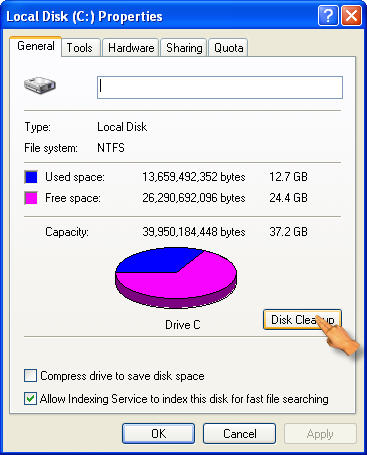
There's also the clean up tool on your software which is the component of internet cleanup application, it is used to remove files that are created when your searching things up on the internet this includes the cookies the history and more. the cleanup tool software cleans up the browsers and it can remove to free up system resources. its important to have the clean up tool to delete all your browser history cookies searches etc.
 

Hardware Components

Processor

A processor is basically the brain of your computer that you save everything to. The speed of the processor on now days are really fast, but the old computer it can be really slow.  The speed could sometimes also be on how much things you have saved on it. Its very important for you not to overfill the memory or you computer would be really slow.

Memory e.g. RAM

A memory ram is basically the memory of your computer, its where you save everything on that you put onto your computer, if your computer ever breaks you can take the memory ram out and put it on a different, you must have a memory RAM on your computer to use it or you wont be able to save anything to it. its very useful for music, pictures, computer programs, and anything you want to add to you computer. 


Friday, 21 October 2011

Output Devices


A printer is a hardware output device,
When you do work on your computer you can plug your printer onto your computer and then print your work out.
Printers are useful for lots of things,
There are different types of printer that allows you to print out pictures on to picture paper.
Some printer prints things out for a wall as in a bigger size than the A4 sheet


A monitor is a hardware output device.
If you have a computer you will need a monitor or you wont be able to see what your doing.
There are some types of monitors that wont damage your vision which is the HD monitor it does less effect to your eyes than a normal screen would do.
If you have a computer you need the monitor for you to see what your doing.


Speakers is a hardware output device that you plug into your computer.
Speaker is a good hardware device that plays sound through it
Its good to listen to music etc.
Most people have speakers on their computers
When you buy a laptop it already comes with speakers build into it.

Storage Devices

 
A hard disk is a peace of hardware that holds software's. Its very useful for when you want to post any times of software programs or important files you can. And you can also get type of hard disks that holds lots of memory so you can put more than one thing on to it.  You nomraly get ones which is  40-140 Gb's
 
 
A memory flash disk is another type  of hardware that hold software programs or files into it.
The difference of it is that its connected by USB its very easy to use and their very cheap, you can get them by difference sizes like 3 GB or 40 GB depends how much you need.
 
 
A CD ROM is another is a disk that holds up peaces of software. Its mostly used for software programs, DVD and music. You can normally buy them with music already on them, people mostly buy them which movies on them.

Thursday, 20 October 2011

Devices for Network Connection


This is all bout different ways to connect a computer network, with that i will be discussing the following.
3G - 4G
Wireless/Bluetooth and network interface cards.
 
3G the meaning for it is 3rd generation, it’s a mobile technology. Its associating with 3g provide the ability to transfer both voice data and non voice data. 3g is a wireless transmission speed, which allows full motion video and high-speed internet access. That is faster internet access anywhere where you can receive 3g connection its as fast as it would be if your were connected to the wifi.


4G the meaning for it is 4th generation. 4G is their 4th generation of mobile network, if you have it you will have a faster internet speed and you get better quality on videos. Again that is for anywhere sometimes you find that video qualities on mobiles phones are very poor but not if you have 4g it will help alot for better graffics etc.


Bluetooth is a wireless connection, for communication and sending files (pictures and songs) from device to device e.g. phone to phone etc, it can also be used to connect to a pc to printers digital cameras PDA’S and mobile phones there’s lots more types of Bluetooth devices to be connected and to send files. Wifi also allows you to get good internet access on your computer and mobile phones.


A network interface card (NIC) is a card inside the computer when connected to a modem via network cables enables the computer to connect to the internet. It can also be used to connect several computers to a network via a router.  People would more than likely to use this on Lan houses which is a place where allows people to go and acess to the internet. so instead of having so many routers they could just have the network interface card which would allow them to use one router for all the computers to give them all internet access.

Friday, 14 October 2011

Input Devices


Keyboard is also an input device.
Its a pad with letters and numbers in it.
So you can use it for typing in information.
It also can turn the letters into capitals.
It has its setting on it for num lock caps lock and scroll lock.
You can also use it as a piano for some types of programs by using the keys.
You can also get lazer keyboards.


A mouse is an input device.
The mouse is usually attached to a computer through a USB drive, some are wireless

it makes an arrow move around the screen of your computer, so you can click on icons highlight letters etc.


its used to draw images on a touch screen when you buy it, it usually comes with a pen for the touch screen.
Game controller
 a game controller is an input device that you can use to play games with, its better than using a mouse or a keyboard, its an input device use by lots of people all over the world

 
Its used to draw images on a touch screen when you buy it, it usually comes with a pen for the touch screen.
Game controller
 a game controller is an input device that you can use to play games with, its better than using a mouse or a keyboard, its an input device use by lots of people all over the world

Its an input device
You can plug it in your computer  to play games with instead of using a mouse or a keyboard, its very useful and entertaining .
Its a hardware device and the buttons on it would control the game that your playing on your computer.


There are many types of touch screen devices, example, there are types of mobiles phones that are touch screen, there are also touch screen iPods, tablets. Touch screen is a new technology for phones etc, lots of teenagers use it at now days, and their very expensive at the minutes. A touch screen is basically a phone or iPod without button where you can control by touching it instead of pressing the buttons